
Run a Shopify store? Give customers your loyalty card in Apple Wallet and Google Wallet.
Install free on ShopifyMultipass. Your server creates an encrypted token with the customer's email and sends them to a Shopify login URL; Shopify signs them in. Shopify Plus only, and no longer available to new stores: stores that already use it keep it.
Your own identity provider. On new customer accounts, Shopify Plus stores can connect an OpenID Connect (OIDC) identity provider, so customers sign in with the same account they use on your other sites. This replaces the standard Shopify sign-in.
Customer Account API. For headless storefronts (Hydrogen or custom), you sign customers in with OAuth 2.0 and call the API with a customer access token.
Rule of thumb: if Multipass is already on in your admin, keep using it. If you are starting today on Plus, connect an OIDC identity provider. If you run a headless storefront, use the Customer Account API.
Multipass is Shopify's token-based SSO for Shopify Plus. A customer signs in on your system, your server builds a small JSON record (email plus a timestamp), encrypts and signs it with your Multipass secret, and redirects the customer to your store's Multipass login URL. Shopify checks the token, finds or creates the customer by email and signs them in.
According to Shopify's Multipass documentation, Multipass is no longer available to new stores, and stores that already use it keep access even after they upgrade to new customer accounts. It follows whichever customer account version the store uses. On new customer accounts, a customer signed in through Multipass gets the account features you have turned on at checkout, such as store credit and saved payment methods.
Typical uses: a membership or content site that sends members to the store, a mobile app that opens store pages in a web view, and links from emails or loyalty cards that should open the account already signed in.
Each token is built in four steps, all on your server:
First, hash the Multipass secret with SHA-256. The first 128 bits are the encryption key and the last 128 bits are the signing key.
Second, build the customer JSON. It must contain email and created_at (the current time in ISO 8601). Optional fields are first_name, last_name, tag_string, identifier, return_to and addresses. The remote_ip field is deprecated and no longer supported.
Third, encrypt the JSON with AES (128-bit key, CBC mode, random initialization vector), then sign the encrypted data with HMAC-SHA256. Join the encrypted data and the signature and encode them as URL-safe Base64.
Fourth, redirect the customer to /account/login/multipass/{token} on your store, or to /login/multipass/{token} on your customer account domain if the store uses new customer accounts.
A token is valid for 15 minutes and can be used once. Generate it when the customer clicks, never in advance. Use return_to to send the customer to the page they wanted, such as a product or their orders, instead of the account home.
If your store has Multipass, it is in Settings, then Customer accounts, in the Shopify admin. Turn it on and copy the secret. Keep the secret in an environment variable or a secrets manager, never in front-end code or a repository.
Shopify uses the email address as the unique customer identifier. If two people in your system can share an email, send identifier as well. Normalize emails before you build the token (trim and lowercase) so the same person does not end up with two accounts.
Use tag_string to tag customers who arrive through SSO, for example "portal-member", so you can segment them in Shopify. Community libraries exist for most server languages; check that the one you pick does not still send remote_ip.
A Multipass token signs someone in without a password, so treat the generating endpoint like a login form: serve it over HTTPS, require your own session first, rate-limit it and log each redirect without the token.
When a token fails, Shopify sends the customer to the normal sign-in page without an error. Check these in order: the token is older than 15 minutes or your server clock is wrong; the token was used twice (for example by a link preview); the secret in your code does not match the one in the admin, often a staging secret or one you rotated; the email in the token differs from the existing customer's email.
If customers bounce between your site and Shopify, your site is probably starting SSO again after the redirect. Set a flag in your own session after the first Multipass redirect.
New Shopify Plus stores use their own identity provider instead. In customer accounts settings you connect an OpenID Connect (OIDC) compliant provider, and customers sign in through it rather than with Shopify's one-time code. Shopify lists the provider requirements in Connect your own identity provider. Because it replaces the standard sign-in, test the full flow, including checkout and order status pages, before you switch it on.
Headless storefronts use the Customer Account API: your storefront runs the OAuth 2.0 flow and gets a customer access token for the signed-in customer, then reads orders, addresses and account data through GraphQL.
On Basic, Shopify and Advanced plans there is no native SSO. Third-party SSO apps in the Shopify App Store can connect providers such as SAML or OAuth services; check how each one signs customers in and whether it works with new customer accounts before you install it.
Loyalty is a common reason to want SSO: a customer taps "see my rewards" or "redeem" and should not have to sign in again. With Multipass, every link you send can open the store already signed in.
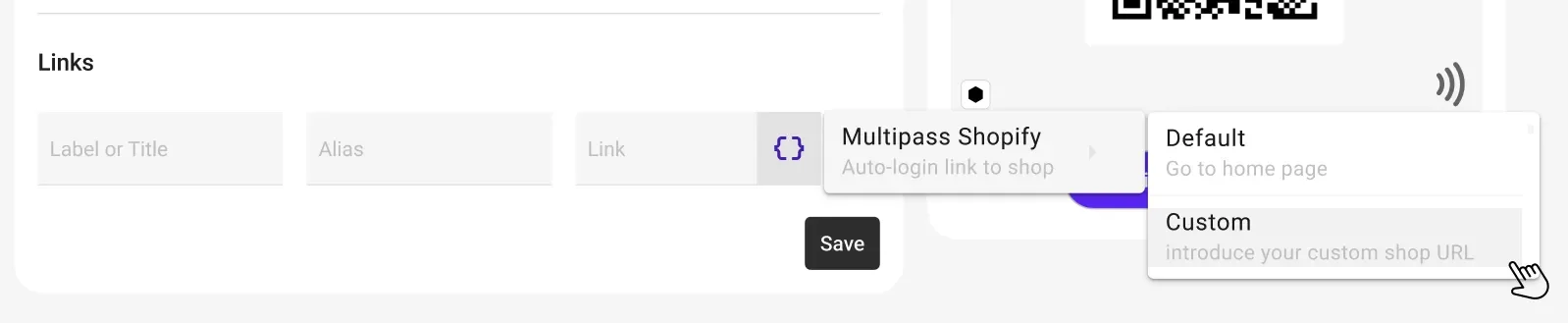
JeriCommerce supports this for Plus stores that have Multipass. You paste the Multipass secret into JeriCommerce under Settings, then Integrations, then Shopify, and links on the back of the wallet loyalty card or in push notifications can use a Shopify Multipass variable. The customer taps the link on their Apple Wallet or Google Wallet card and lands on their orders, account or a product page already signed in.
Without Multipass, the wallet card still identifies the customer where it matters most for loyalty: staff scan it at Shopify POS to load the customer, add points and redeem rewards, with no sign-in. See how to create a wallet loyalty card on Shopify and the omnichannel loyalty program guide.
Shopify SSO depends on your plan and your store's history: keep Multipass if you already have it, connect an OIDC identity provider if you are a new Plus store, and use the Customer Account API for headless builds. Whatever you choose, generate tokens or sessions on the server and test checkout end to end.
JeriCommerce puts the loyalty card in Apple Wallet and Google Wallet, with Multipass links on the card for Plus stores and POS identification on every plan.
Wallet loyalty cards with Multipass links for Shopify Plus, and POS identification on every plan. Free plan available on the Shopify App Store.
Install free on Shopify